GainBrainSign up

Free strength training log · works with Claude

A strength log your AI can read.

Log sets in seconds on your phone. See what your training is really doing. Then ask Claude about it, because it can read the whole log.

Free, no ads. Just an email, a name and a password. Works in your phone's browser; add it to your Home Screen and it opens like an app.

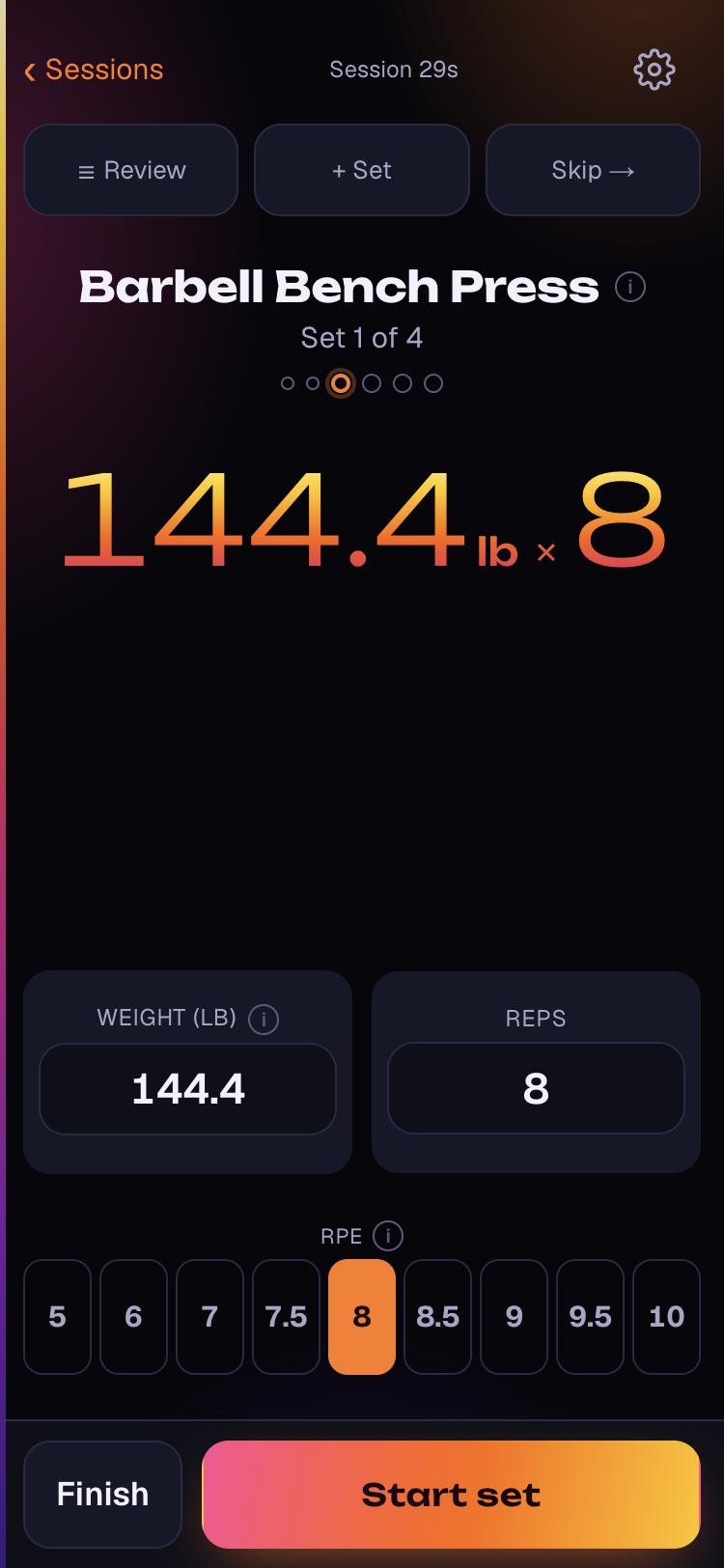
GainBrain's logging screen with the keypad: Barbell Bench Press, set 1 of 4, 144.4 lb for 8 reps, an RPE row from 5 to 10, and a Start set button.

GainBrain is a free strength training log that runs in your phone's browser, charts what your training is doing, and connects to Claude so you can ask questions about your own lifting.

lifts in the library, found by nickname or typo
260
complete looks, each in light and dark
7
ways to enter a set: keypad or thumb dials
2
tools Claude can use on your log
21
named one-rep-max formulas, never a black box
6
ads, trackers or analytics scripts
0

Make it yours: your look, your logging, your AI

Most trackers give you one way to do things. GainBrain gives you three choices that change how it looks, how you log, and how much AI you want in the loop.

Your look

7 complete looks, from Classic teal on graphite to a thermal camera, a meet-day scoreboard and a two-ink risograph print. Each comes in light and dark, or follows your phone.

Thermal. Effort as heat, read off a thermal camera. Tap one: this whole page changes.

Your way of logging

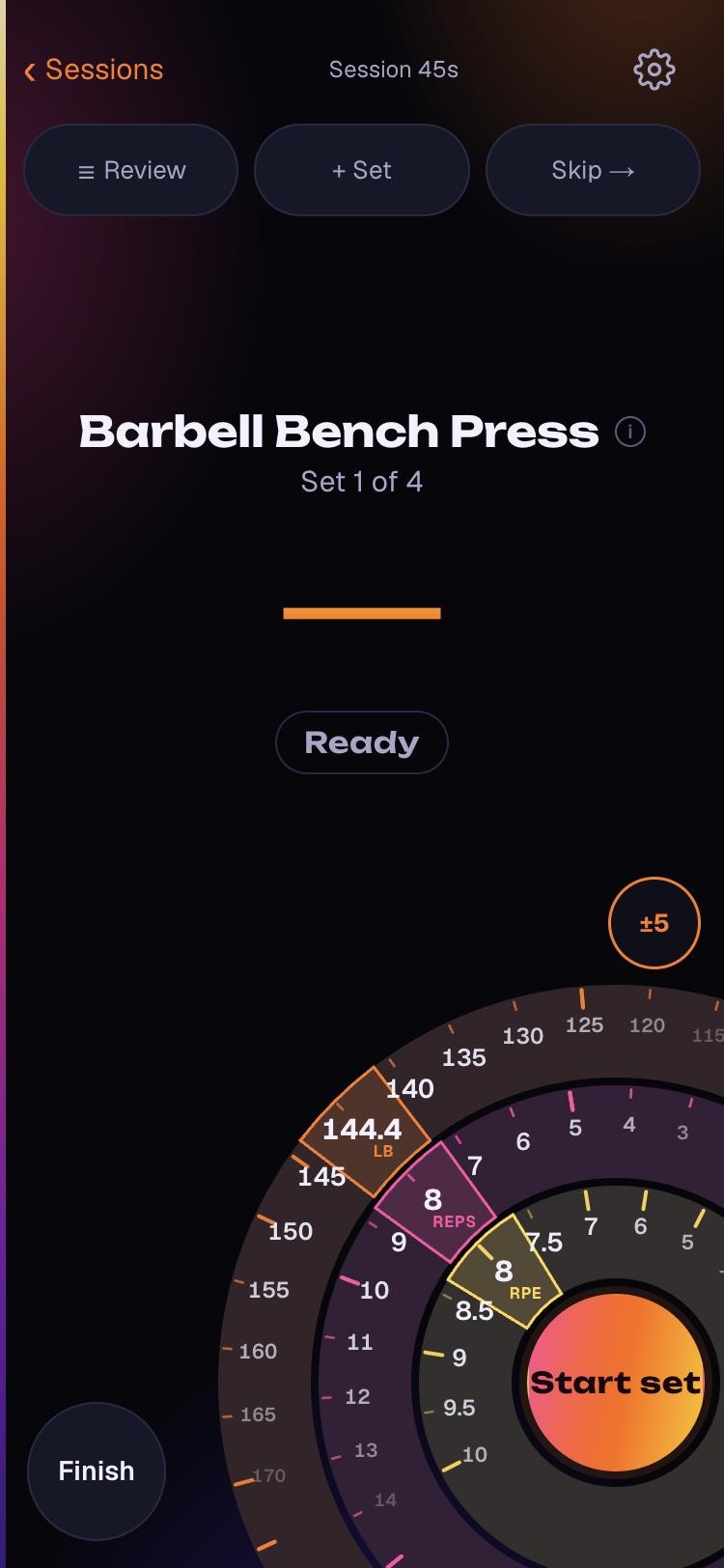
Tap big number fields and an RPE row, or switch on thumb dials and spin weight, reps and effort on three rings with one thumb. Pounds or kilograms, and suggested weights on or off.

GainBrain's logging screen with the keypad: Barbell Bench Press, set 1 of 4, 144.4 lb for 8 reps, an RPE row from 5 to 10, and a Start set button.
Keypad. Big fields and an RPE row. The default.
GainBrain's logging screen with thumb dials: three curved rings for weight, reps and RPE around a Start set button in the bottom corner.
Thumb dials. Spin weight, reps and RPE with one thumb.

Your level of AI

Use the charts in the app and nothing else, let Claude read your log, or let it log sessions and set plans too. Every write waits for your yes, and you can disconnect at any time.

  1. App only. Charts and records, no AI.
  2. Read. Claude answers from your log.
  3. Read and write. Claude logs and plans, after you confirm.

Workout logging that stays out of the way

You're between sets with one free hand. Logging should take seconds, not attention.

One set at a time

The screen shows the set you're about to lift, with big targets for a sweaty thumb. Last session's numbers are already filled in, so repeating a set is a single tap.

A clock that knows rest from work

Tap Start when you pick up the bar and Done when you rack it. GainBrain records rest and working time separately, and the rest timer starts on its own.

Supersets that run themselves

Pair any exercises with the superset picker and the app moves you between them, round by round, so you never lose your place.

Your next weight, suggested

Optional. When last session went well, GainBrain offers a heavier weight or one more rep, and says why when it holds the weight instead.

260 lifts, found in three letters

Search forgives typos and knows that RDL and Romanian Deadlift are the same lift. Anything missing, you add as your own exercise.

Every kind of lift, counted right

Barbell, dumbbell, machine, cable, kettlebell and bodyweight. One-arm lifts are logged per side, push-ups count your bodyweight, and assisted pull-ups count bodyweight minus the assistance.

Templates for the sessions you repeat

Save any workout as a template and start the next one from it in a tap. Claude can write templates for you too.

Warmups and effort, captured

Mark warmup sets so they never inflate your volume, and rate effort as RPE from 5 to 10, with half steps where they matter.

Nothing lost mid-workout

Every tap is saved as you go. Reload, switch apps or crash halfway through and your session is still there, and the screen stays awake while you train.

Bring your Strong history

Switching from Strong? Import its CSV export and your old sessions appear in the same charts as the new ones.

Switching from Strong? How to import your history →

Training analytics: see what your training is doing

Worked out from your log every time you look, so it never drifts from what you actually did. These are real screens from a demo account.

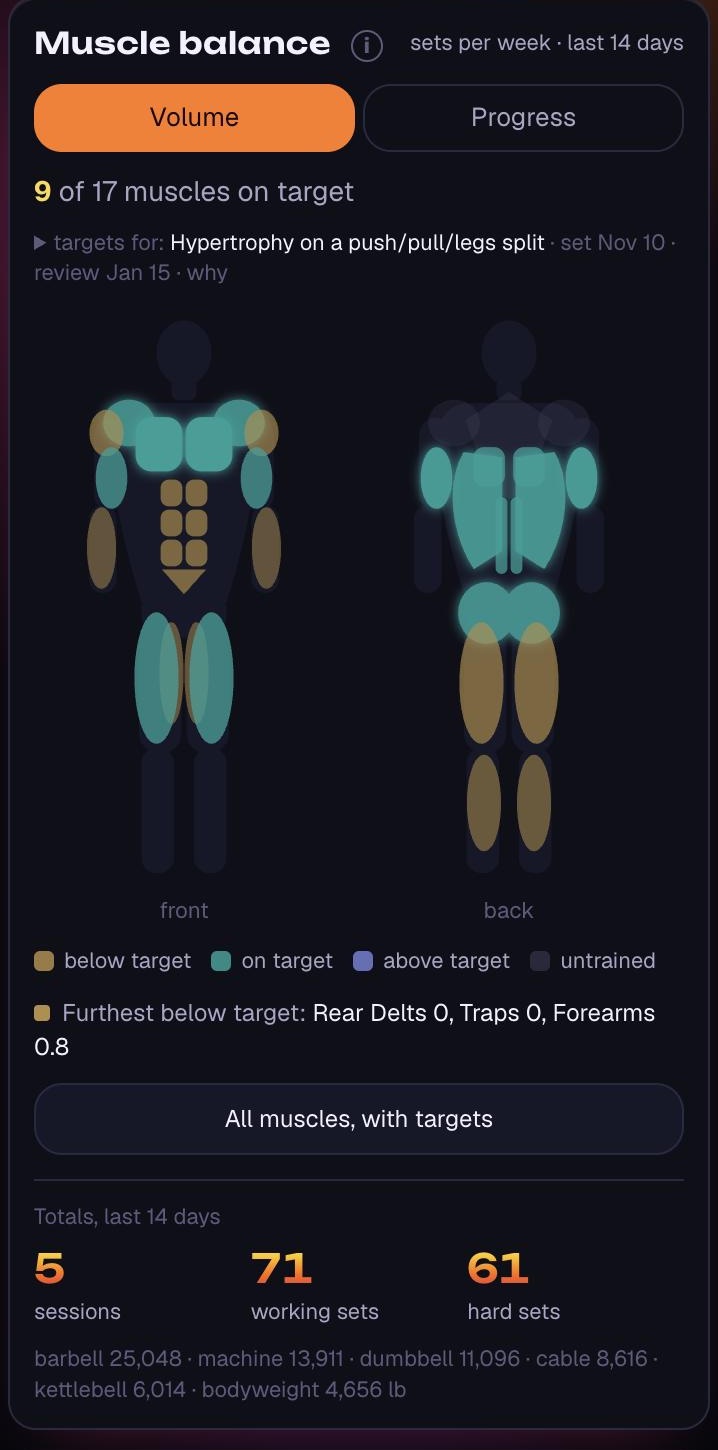
Volume per muscle, against your plan

Weekly working sets for every muscle, graded against targets you set (or Claude helps you set). A body map shows what's getting trained and what isn't.

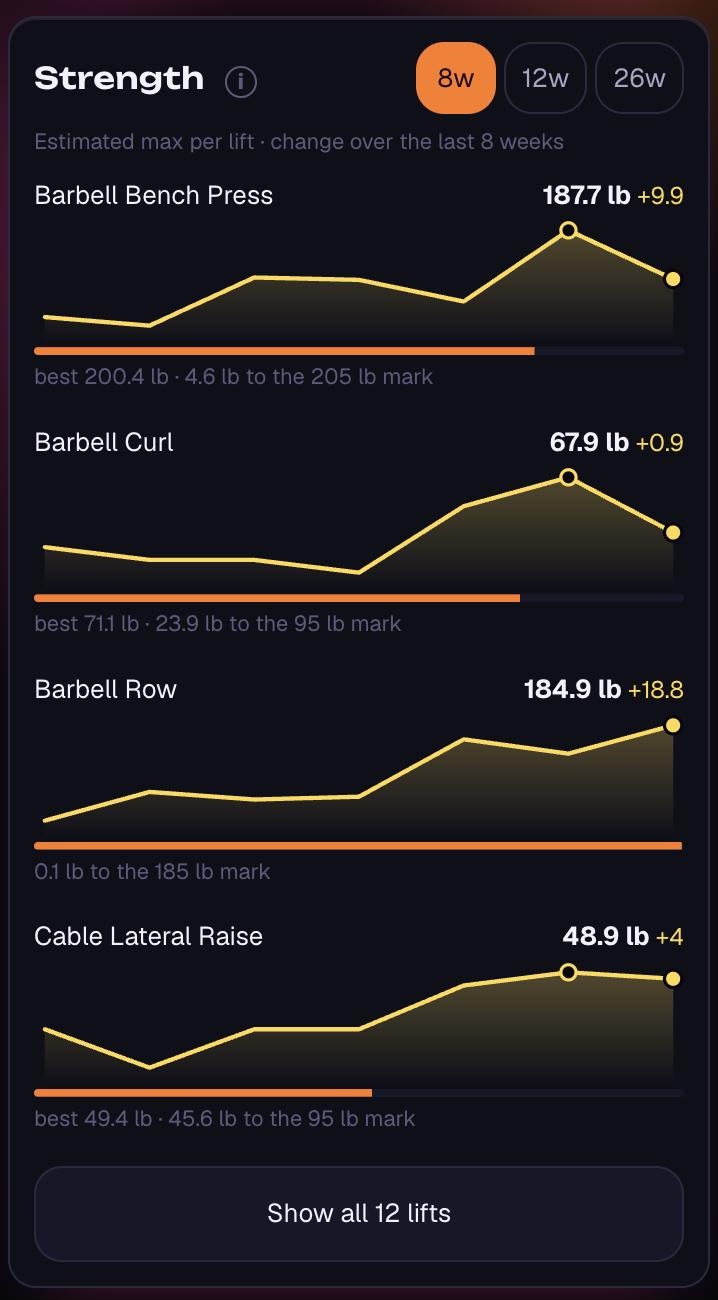
Strength trends you can trust

Estimated one-rep max for each lift over time, with the formula named on every figure. Epley is the default; five others are a question away.

Stalls, flagged early

When a lift has been flat for weeks, GainBrain says so plainly, so you can change something before a month disappears.

Records and milestones

A feed of personal records, lift by lift, and how far you are from the next round number on each one.

Balance between lifts

Push against pull, and strength ratios between your main lifts, so a lagging movement shows up before it becomes a problem.

Consistency, in plain sight

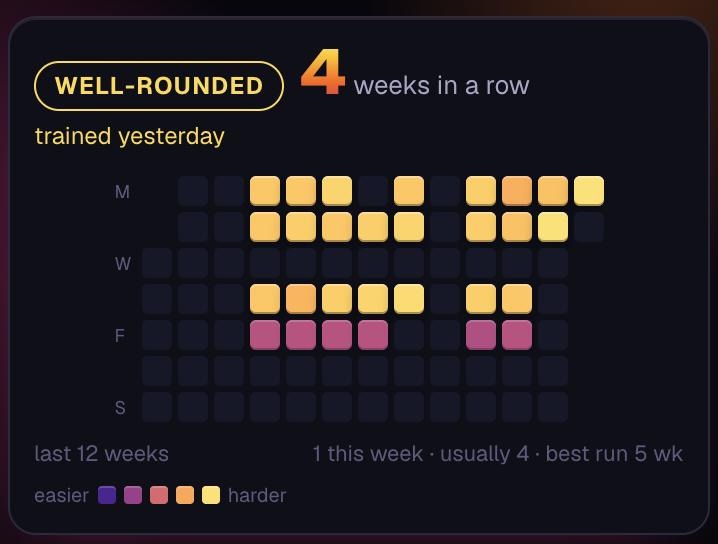
This week's training days, your streak, and a twelve-week grid of how regularly you actually show up.

Rest, measured

Because the clock knows rest from work, you can see how long you really rest between sets, not just how long the session took.

A summary of every session

Each workout gets its own page: records set, volume split by equipment type, rest and working time, and every exercise and set.

Ask Claude about your own training

Connect Claude on the web, desktop or your phone, with nothing to install. It reads your sessions, volume and records directly, so you get answers about your lifting instead of generic advice.

YouIs my bench actually stalling, or was it just a bad month?

ClaudeIt's a real plateau: your estimated max has sat around 225 lb for five weeks. Two things changed over the same stretch. Your chest work dropped from about 12 sets a week to 7 when you stopped doing incline dumbbell press, and your last three bench days were all RPE 9 or higher. I'd bring the incline press back for 3 sets and keep bench at RPE 8 for two weeks. Want me to update your Push template?

An example. Claude's real answers are worked out from your own log.

What Claude can read

  • Every session and set you've logged
  • Exercise history, records and estimated maxes
  • Weekly summaries, stalls and muscle volume
  • Strength ratios, your training plan and templates

What it can do, only if you allow it

  • Log a session, or correct one
  • Build and edit templates
  • Set training targets for each muscle
  • Add your own exercises

Every change waits for you to confirm it.

Connect in about a minute

  1. Add to Claude opens Claude with GainBrain already filled in. Choose Add, then Connect.
  2. Sign in with your GainBrain account. Read-only unless you tick write.
Add it by hand, or use Claude Code

In Claude, open Customize → Connectors, add a custom connector and paste this address:

https://gainbrain.app/api/mcp

In Claude Code, run this, then /mcp and Authenticate:

claude mcp add --transport http gainbrain https://gainbrain.app/api/mcp

The full guide to connecting Claude →

Things people ask it

  • “Which muscles have I been neglecting for the last two weeks?”
  • “Write me a four-day plan around what I've really been doing.”
  • “How much has my squat gone up since March?”

Honest numbers

A tracker is only as good as its arithmetic. These are the rules GainBrain keeps, so the charts mean what they say.

Warmups don't count

Warmup sets are kept out of every volume figure, so a long ramp-up never passes for hard work.

Both sides count

A one-arm row is logged per side and counted for both, so unilateral work isn't read as half as hard as it was.

Bodyweight is real weight

Push-ups and pull-ups count your bodyweight, and tonnage is split by equipment type so they can't swamp your barbell numbers.

Unrated sets are never hard sets

Only sets you rated RPE 7 or above count as hard. Skip the rating and GainBrain understates your effort rather than inventing it.

Your day stays your day

A 9 pm session stays on the day you trained, in your own time zone, even when you travel.

Units never rewrite history

Everything is stored in kilograms and shown in your choice of unit, so switching between pounds and kilograms changes nothing you logged.

How volume is counted →How one-rep maxes are estimated →

Your data stays yours

  • No advertising, no analytics or tracking tools
  • Your data is never used to train AI models
  • Claude sees only your own log, enforced on the server
  • Export everything, any time
  • Delete your account in the app and your data goes immediately

The details are in the Privacy Policy and the Terms of Service.

Frequently asked questions

What is GainBrain?

GainBrain is a free strength training log that runs in your phone's browser, charts what your training is doing, and connects to Claude so you can ask questions about your own lifting. It is built for the gym: one set at a time, a rest timer that starts on its own, and last session's numbers already filled in.

Is GainBrain free?

GainBrain is free to use, with no ads.

Is there an app to download?

There's nothing to download. GainBrain runs in Safari, Chrome or any modern browser on iPhone, Android or a computer. Add it to your Home Screen and it opens full screen, like an app.

Does GainBrain work offline?

GainBrain needs a connection to open. Once a workout is open, every set is saved on your phone as you log it, so a reload or a crash mid-session loses nothing.

How do I connect GainBrain to Claude?

The quickest way is the Add to Claude button on GainBrain's home page: it opens Claude with the connector already filled in, so you choose Add, then Connect, and sign in with your GainBrain account. To do it by hand, open Customize, then Connectors in Claude, add a custom connector, paste https://gainbrain.app/api/mcp, and sign in the same way. That one connector works in Claude on the web, the desktop app and the mobile apps, and Claude Code connects to the same address with the same sign-in. There is nothing to install.

Can Claude change my training data?

Only if you let it. A connection is read-only unless you tick the write option when you sign in, and even then Claude must ask you to confirm before it saves a session, template or plan.

Does GainBrain work with ChatGPT or other AI assistants?

GainBrain is built and tested with Claude. It is a standard remote MCP server with OAuth sign-in, so other assistants that support MCP connectors may work, but Claude is the one it is tested with.

Can I import my workouts from Strong?

Yes. Export your history from Strong as a CSV file and import it under Account, Import. Your old sessions then appear in the same charts and records as new ones.

Does GainBrain use pounds or kilograms?

Both. Pick either in Account. Every weight is stored in kilograms and converted for display, so switching units never changes your history.

How does GainBrain estimate a one-rep max?

GainBrain estimates a one-rep max with the Epley formula by default, counting the reps you had left in reserve from your RPE. 5 other formulas (Brzycki, Lombardi, Wathen, Mayhew and O'Conner) are available through Claude, every figure names the formula behind it, and estimates from sets above 10 reps are flagged as less reliable.

What exercises does GainBrain support?

GainBrain's library has 260 lifts across barbell, dumbbell, machine, cable, kettlebell and bodyweight training, searchable by common nicknames. You can add your own exercises too.

Is my data used to train AI?

No. Your training data is never used to train AI models, and Claude only reads it when you connect it yourself.

Can I export or delete my data?

Yes. You can export everything you've logged at any time, and delete your account in the app, which removes your data immediately and from backups within 30 days.

Who is GainBrain for?

GainBrain is for anyone who lifts and wants a fast log with real analysis. Newer lifters get suggested weights and a plain view of what they've trained; experienced lifters get RPE, rest-versus-work timing, one-rep-max trends and volume against a plan.
Start with your next workout